What is Port 1900?
by Erik Mikac | Published on May 19, 2025
In networking, ports act as doorways for data exchange between devices and applications. Port 1900, while less renowned than ports like 80 or 443, plays a significant role in device discovery and communication. Its most notable uses are Simple Service Discovery Protocol (SSDP) and Universal Plug and Play (UPnP). That's the short and skinny of it, but there's more to it than that.
Let's review Port 1900’s functions, common applications, security considerations, and troubleshooting tips. Hopefully, this overview will act as a thorough guide for network administrators and enthusiasts alike.
What is Port 1900?
Port 1900 is a UDP port primarily used by the Simple Service Discovery Protocol (SSDP), a fundamental component of the Universal Plug and Play (UPnP) framework. SSDP enables devices on a network to discover each other and advertise their services without manual configuration.
For example, a smart TV can locate a media server, or a printer can announce its availability to computers on the same network. Port 1900 is crucial for device interaction in home and small office networks. Its "plug-and-play" feature simplifies connections.
UPnP is another player involved with Port 1900. It extends SSDP's capability by allowing devices to configure themselves automatically ("Automagically," as they say). Port 1900 also serves as the default channel for SSDP’s multicast discovery messages.
This handy feature enables devices to broadcast their presence and respond to queries. Due to SSDP's lightweight nature, UDP is generally the standard protocol for Port 1900. However, some implementations may involve TCP for specific tasks, even though it isn't as common.
Technical Overview
Port 1900 mainly uses UDP. It also relies on SSDP's multicast features. Here’s how it works:
Device Advertisement
When a UPnP-enabled device joins a network, it sends multicast messages via Port 1900 to the address 239.255.255.250. This message announces its services to likely participants and includes details like the device’s IP address, type, and available functions.
Discovery Requests
Devices seeking services send SSDP “M-SEARCH” queries to port 1900. Other devices listen on this port and respond with unicast messages containing their service details.
Communication Protocols
SSDP sends messages to UDP for discovery. However, subsequent communications often shift to other ports or protocols like HTTP/TCP. The lightweight UDP ensures low overhead, ideal for dynamic networks with frequent device changes.
An SSDP Analogy
Imagine a town square where devices (like smart TVs, printers, or IoT gadgets) are people looking to share or find services. Instead of knocking on every door, they post notices on a public bulletin board (Port 1900). A printer would say, "I’m a printer, here’s what I can do." or "I’m a media player and I'm looking for a streaming server." Others in the square can read these notices and respond directly. Your PC would read it and reach out to the printer. "Hey, I'm a PC needing a printer, let's connect."
This bulletin board operates without a central organizer—everyone posts and checks it freely. This makes it simple and lightweight, much like SSDP’s multicast messages. Each message enables devices to discover each other on a network. However, like an open board, it needs to be watched to prevent misuse, reflecting SSDP’s security considerations.
Common Applications and Devices
Port 1900 shows up in all kinds of everyday devices—especially those that need to find and connect with others on your local network quickly. Common devices that use this port include:
Smart TVs and Media Players: Devices like Roku or Samsung TVs use Port 1900 to discover streaming servers like Plex.
Gaming Consoles: The PlayStation and Xbox rely on UPnP for multiplayer gaming and media sharing.
Network Printers: Printers advertise printing or scanning services via SSDP.
IoT Devices: Smart bulbs, cameras, and hubs use Port 1900 for integration.
Routers: Many routers support UPnP to simplify port forwarding for apps like torrent clients or games.
Ultimately, Port 1900’s role is discovery-focused. It initiates connections, but doesn’t handle data transfer. The actual exchanging of information is dynamically assigned to other ports.
Troubleshooting Common Issues
Issues with Port 1900 often stem from network misconfigurations or security restrictions. Here are common problems and solutions:
Devices Not Discovering Each Other
Ensure firewalls or routers don’t block Port 1900. A tool like Wireshark can be used to capture UDP traffic on Port 1900 and verify multicast packets. Check that UPnP is enabled on devices and routers.
Intermittent Connectivity
Multicast issues may arise in large networks. Confirm that your router supports IGMP to manage multicast traffic efficiently. Splitting large networks into VLANs can also help.
Port Conflicts
If another application uses Port 1900, SSDP may fail. On Windows, run netstat -an | find "1900" or on Linux/Mac, sudo lsof -i :1900 to identify conflicts. Reconfigure the conflicting app to use a different port.
Router Issues
Some routers throttle UPnP traffic. Update router firmware or disable and re-enable UPnP to reset configurations.
For deeper diagnostics, consult device logs or use network scanners like Nmap to check Port 1900’s status. Run a command like this: nmap -sU -p 1900 <IP> for UDP scans.
Security Considerations
Port 1900’s openness for discovery makes it a potential security risk if mismanaged. Key concerns include:
UPnP Vulnerabilities
UPnP trusts devices on the local network. This means malware-infected devices can use Port 1900 to open unauthorized ports or redirect traffic. Older routers have historical vulnerabilities that allow remote attackers to change UPnP settings.
DDoS Amplification
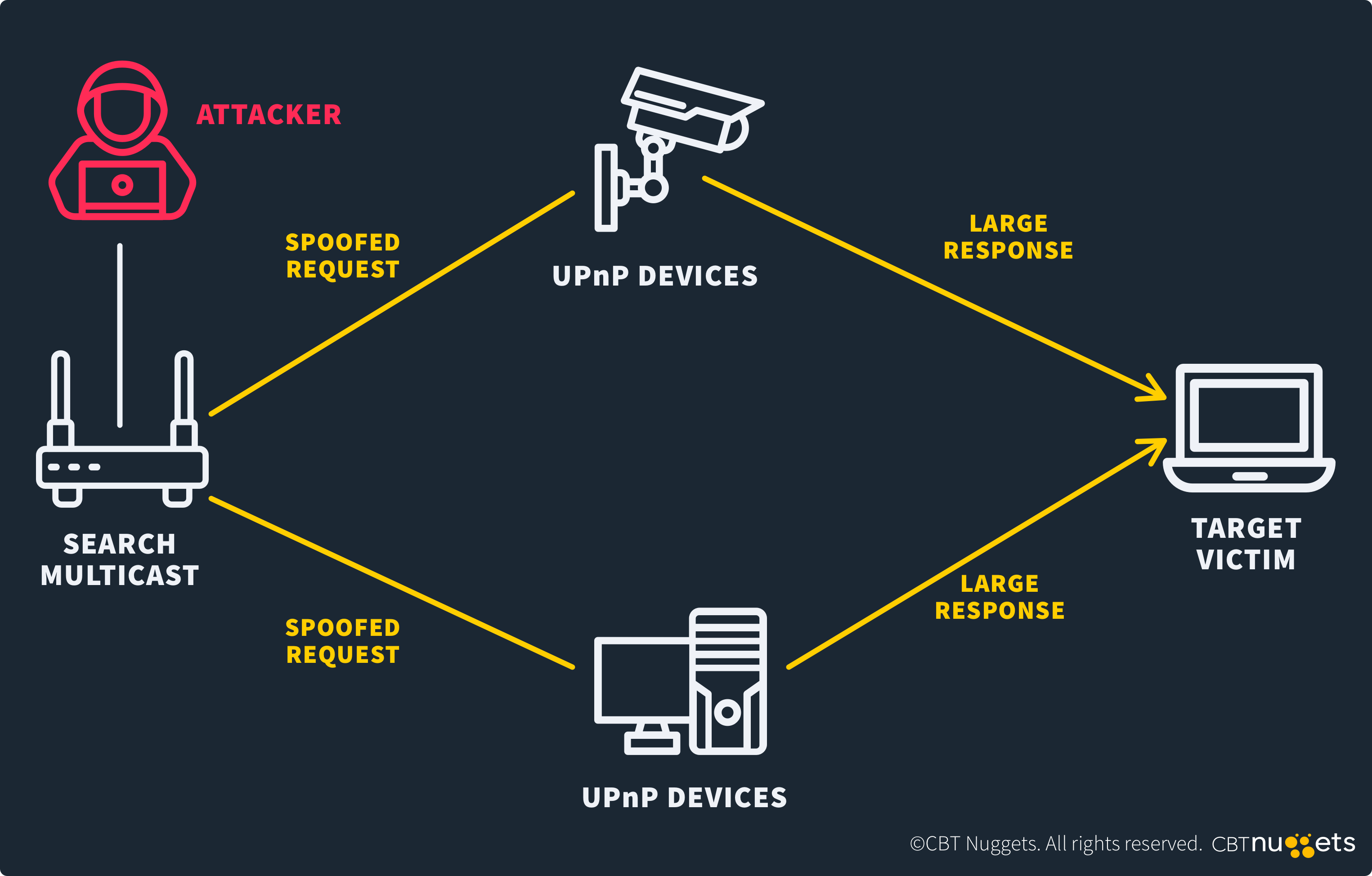
Reflection attacks are a common concern with SSDP, largely due to its multicast nature. These attacks occur when attackers spoof requests to Port 1900, flooding victims with responses. Exposed Port 1900 on internet-facing routers exacerbates this.
Unauthorized Access
If Port 1900 is accessible externally, attackers could scan your network remotely. This can lead to unauthorized access or giving a hacker information they should not be privy to.
Best Practices for Port 1900
Here's a list of best practices for using port 1900 to its fullest extent while maintaining a tight security posture.
Firewall Configurations: Block Port 1900 from external access on your router. Allow it only within trusted local networks. Use strict firewall rules to limit multicast traffic to known devices.
Disable UPnP When Not Needed: Turn off UPnP on routers and devices if you don’t use media sharing, gaming, or IoT integrations. Manual port forwarding is safer for specific applications.
Network Segmentation: Place IoT devices on a separate VLAN to isolate UPnP traffic from critical systems.
Monitor Traffic: Use an intrusion detection system (IDS) to flag unusual SSDP activity. Regularly check router logs for unexpected UPnP requests.
Firmware Updates: Keep routers and devices updated to patch known UPnP vulnerabilities.
FAQs
What is the Primary Function of Port 1900?
Port 1900 facilitates device discovery via SSDP, enabling UPnP devices to advertise and locate services on a network.
How Does Port 1900 Interact with UPnP Devices?
Port 1900 carries SSDP multicast messages for device advertisements and discovery queries. This allows UPnP devices to connect without manual setup.
What are the Security Risks Associated with Port 1900?
You'll need to be careful of UPnP exploits, DDoS amplification, and unauthorized device access. Also, make sure Port 1900 isn't exposed or poorly configured.
Can I Disable Port 1900 Without Affecting My Network?
Yes, if UPnP isn’t needed, disabling it on routers and devices won’t impact core network functions. Also, manual configurations can replace UPnP if necessary.
Conclusion
Port 1900 may operate quietly, but its role in device discovery via SSDP and UPnP is critical for modern networks. From smart TVs to IoT gadgets, it powers the plug-and-play experience users have come to expect.
However, its open nature demands vigilance. Unsecured Port 1900 can easily invite exploits or disruptions. By understanding its mechanics, securing configurations, and troubleshooting, admins can effectively harness Port 1900’s benefits. In an era of connected devices, mastering such ports ensures both functionality and safety.
Curious about mastering networking? Start your CCNA journey today.